Showing posts with label monitors. Show all posts

Wednesday, May 16, 2018

Why I wouldn't buy a Sony BVM-X300 in 2018 (if it was my money)

For a couple of years the Sony BVM-X300 has been the 4k/HDR monitor of choice for Soho edit and grading suites. It is an OLED monitor and can (with some limits) hit 1,000 Cd/m2 peak white in it's HDR modes (which include HLG, Dolby PQ and SLog3 camera gamma).

It was the first monitor to be widely regarded as good enough for Dolby Vision mastering (and by extension Netflix deliverables). It was around the £20k mark when it launched, but by last year the price had crept up to mid-twenties and with the v2 of the monitor (which brought a second quad-SDi input and an HDMI input) which launched a year ago it now lists at £32k; but we all know nobody ever pays list for Sony...!

In recent months I've really taken to the Eizo CG3145 which (although an IPS/LCD monitor) is broadly similar in spec to the Sony, but; bear in mind the X300 suffers the following;
  1. Noise in the blacks; when I calibrate them I have to do blacks at 5% grey to get a clean reading (and my probe goes down to 0.01 Cd/m2) – the Eizo will read cleanly at 2% grey. Watch this video (hosted on my Twitter feed) - it's an X300 around 3 Cd/m2
  2. Max. 8% peak white before the orange PSU-fault LED comes on and the display starts to dim/de-saturate in HDR modes; at the recent Jigsaw24 I showed the "OLED killer" which you can get here.
  3. Two years in and several Soho X300s are now showing burn-in (particularly where the 3840-pixel UHD and 4096 pixel-4k rasters differ) 
£10k less list price and available now (the X300 is in such short supply that you can't get one in London currently) also add to the Eizo’s advantages. Integration with LightSpaceCMS (pretty much the industry standard for colour management) is very tight whereas the X300 only talks to Sony’s very clunky colour software (no LUT management, six-point calibration only). 

The Eizo easily allows LUT upload; this SLog3 (in slot 8) was imported via LightSpace.
 
The Eizo has recently been certified as both a Dolby Vision mastering display as well as having Netflix's blessing.


One objection I've heard is that the X300 covers 85% of rec.2020 whereas the CG3145 only covers ~83%. It's the kind of objection that someone with a poor grasp of colourimetry makes. My answer to that is "MacAdam ellipses" - look at the Wikipedia article and tell me anyone can see the (Just Noticable!) differences.


At the recent HDR Summit at Dock10 in Media City, Salford we had more than ten HDR-capable displays.

Friday, September 22, 2017

A few notes on DolbyPQ & the new 4k AppleTV and TV High Dynamic Range.

STOP PRESS! 27th Sept. 2017 Update;

So it turns out that the new AppleTV does support HLG.


- Why did it take somebody hacking around with a firmware update to discover it; perhaps big corporations (Apple and Dolby) talk and would rather not highlight the fact?


HDR is half my life at the moment; the distinction between "Display Referred" and "Scene Referred" video is lost on most people, but is pretty central to understanding why the BBC/NHK "Hybrid Log Gamma" system is ten times more appropriate for television (non-theatrical video) vs anything based on the SMPTE 2084 (AKA Dolby/HDR10 etc) curve.

For my presentation on "intro to HDR for TV" download here.
  1. Display Referred HDR makes no sense for TV (when I say TV I mean all non theatrical video). DolbyPQ makes video dimensioned (so code values actually represent light levels) which makes a lot of sense when you have complete control over the environment you're viewing in - a theatre. To define where black and white sit (and actually assign light-levels to them) is problematic for TV workflows. Remember, you have to give the colourist/racks-engineer/domestic-viewer the liberty to set black according to the room. Although BT.1886 is commonly accepted to mean 100Cdm-2 peak white a lot of colourists drive their rooms at 80Cdm-2 and at least one film guy I know prefers to work at 60Cdm-2. Also - what happens in three years when everyone is selling TVs with specular highlights that can hit 2,000Cdm-2 and people can see the difference between PQ content mastered with peaks at 1,000Cdm-2 ( the current standard) and new content? The same will be true all the way up to Dolby's max light level of 10,000Cdm-2. Dolby at least has the benefit of dynamic metadata to allow or this, but HDR10 is static metadata and so has all the problems of display-referred HDR with none of the DolbyPQ benefits.
  2. BBC/NHK HLG is a much more pragmatic solution as it doesn't assign code-value to light-levels (when has that ever been a thing in TV?!) and allows HDR content to look good on all devices capable of displaying it; tablets, TVs, laptops etc. It also allows the broadcasters to make a gradual change to HDR. None of the broadcasters I've spoken to have any appetite for having Dolby CMUs all over the place to manage the metadata (which, being a licensed format, they would be obliged to have). HLG also tracks 1886 for most of the curve (to around 65%) which means conversion to/from is easier and even when you get it wrong the pictures look OK. It's why scene-referred video makes sense for TV.
  3. Having seen the same SLog3 (so camera HDR gamma) played out from Transkoder in both DolbyPQ (mastered at 1,000Cdm-2) next to the same machine converting to HLG with two Sony X300 monitors set for the appropriate gamma curves and the same Rec.2020 colour calibration you could not tell them apart in a blind viewing. 
  4. It's typical Dolby - they are trying to dominate the domestic space by shoe-horning their theatrical format into TVs. Broadcasters get hobbled with licensing costs, onerous upgrade requirements and pictures that are locked to whatever version of PQ/HDR10/HDR10+ they were mastered for rather than allowing the display to make the best of what it's given; scene referred pictures.
  5. The good thing about HLG is that rec.2100 ratifies it, the DVB have too. It's also trivial to upgrade HDR10-capable sets to support it (unlike PQ). I imagine it'll be the case that broadcasters will deliver HDR (for the reasons mentioned) and either you have to upgrade your TV (but pretty much all the current ones support it out of the box) OR your STB will do the conversion.
Which is why the new 4k AppleTV is a damp-squib...   

Monday, March 13, 2017

Calibrating monitors for HLG-1.2 High Dynamic Range working

I've now done a couple of Sony BVM-X300 (4k/HDR OLED panel) monitors for HDR-TV deliverables to the BBC. The Beeb are behind the Hybrid Log Gamma standard, currently at 1.2 for broadcast. It's benefits over Dolby's 10-bit version of their Vision HDR system (also called DolbyPQ) are many and rather splendidly the DVB as well as most manufacturers are now behind HLG. I'll write further about why a scene-referred system is a better bet for domestic TV than a display-referred one (like DolbyPQ) but I just wanted to get down some notes on monitor calibration for HLG.

So first up you need to get the monitor into HDR mode (the correct one! As of v.2 firmware the X300 supports several; the camera gammas; CLog, CLog2, SLog & SLog3 as well as the deliverable standards; SMPTE-2084 (DolbyPQ) as well as SMPTE-2100 (HLG 1.2).


You'll notice the EOTF setting (lit. "Electronic - Optical Transfer Function") is NOT set for HLG 1.2; this available but in the current v. 2.0 firmware it is wrong. Select HLG (Variable), click the know again and dial in 1.2

Next up display a 50% grey field (100% can't be done as the monitor power-limits to stop 1,000Cd/m2 being displayed across a lot of the screen) and point your probe at the display. Remember that unlike DCI-P3 we are still at the 6504K white point of tele. However - at 50% grey we should be seeing low-50's Cd/m2 being emitted from the screen. 


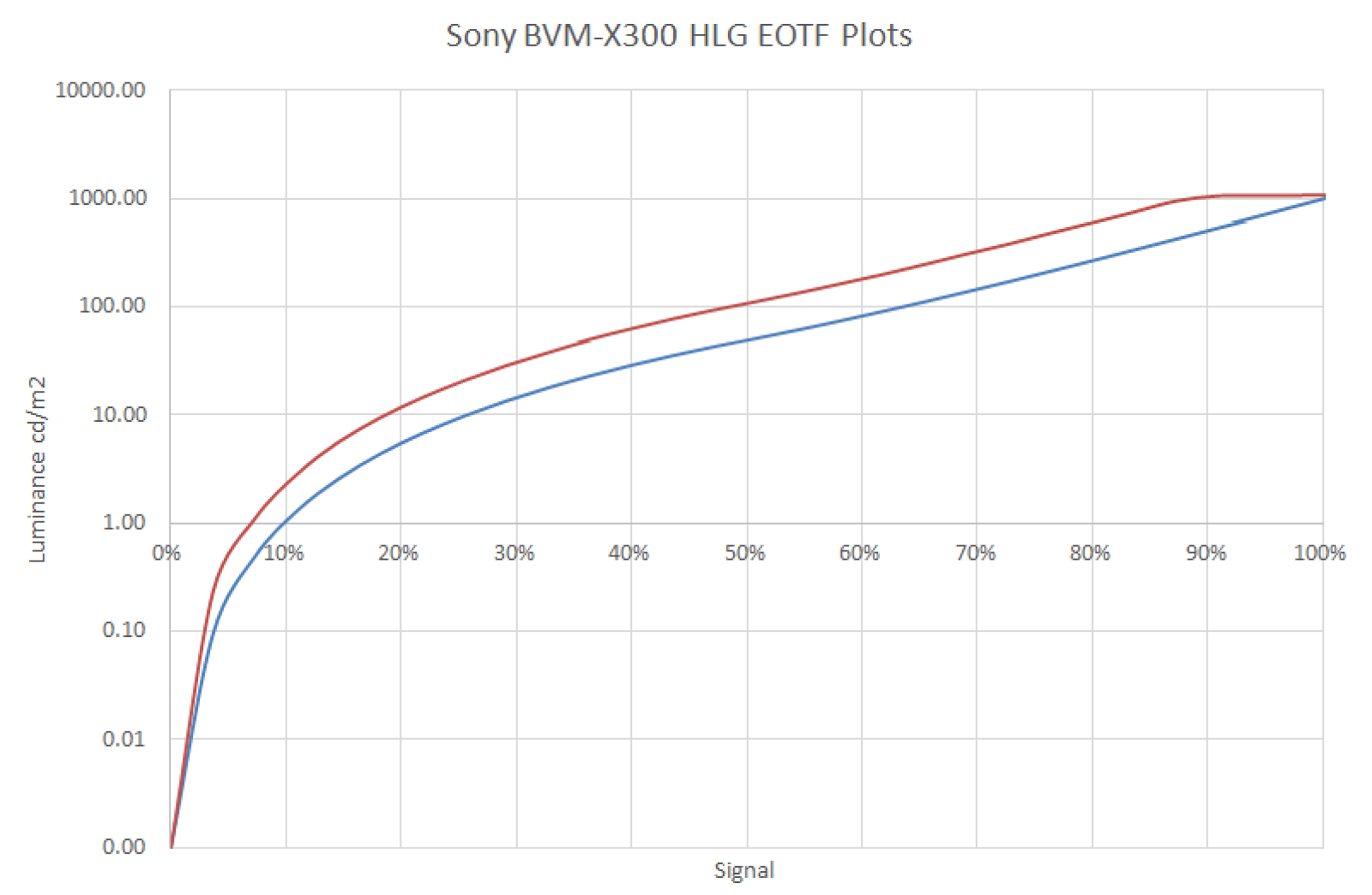
You might have previously heard Sony's "best practise" (sic) advice of setting 50% grey to 100Cd/m2 but this is wrong. Look at the graph; this is the result of profiling an X300 (and they all seem to do it consistently) and notice what happens over the last couple of hundred Candelas at the top end. If you set 50% grey to 100Cd/m2 you get loss of detail in the specular highlights. For the correctly 1.2 HLG curve you need to set 50% to around 50Cd/m2 to 55Cd/m2- remember the Y-axis on this graph is logarithmic. 

The one display I had previously followed the Sony advice for was sufficiently out of it's linear range that the dark-greys drifted red minutes after I finished adjusting the monitor and (like all OLEDs) the noise in their blacks is sufficient to make the final tweak to 6504k hard work - the Klein probe was having to average over 32 reads to accommodate the OLED panel. Remember - the K10A is accurate to less than 0.001 Cd/m2 and not the 1.0 Cd/m2 it reads at 10% up the curve of HLG 1.2

So - once you have those under your belt you can PLUGE the display to set blacks correctly for the room (what did I say about scene/display referred?!) and then set about getting the deep greys and the 50% colour balance correct. I've done this now on two X300s with BBC R&D engineers in attendance and they have given this method their blessing!

For a probe I was using a Klein K10A with Klein's own ChromaSurf software. If I get the chance to profile an X300 for myself I will do it with LightSpaceCMS - still the choice of champions for display profiling and LUT-building. They also have an excellent article introducing HDR.

Monday, January 16, 2017

LUTs are sometimes not the answer.

As I often tell people; a LUT can only reduce the dynamic range of a display. For the most part that needn't matter, particularly if you have the whole of the DCI-P3 (or a decent chunk of Rec.2020) in your monitor. Applying a look-LUT to simulate a delivery style is one thing but increasingly people see LUTs as the first answer to monitor calibration rather than getting the display to as close-as-possible before profiling/creating a LUT. Hugh and I did a podcast on the subject.

A problem I've recently discovered with a monitor's internal Rec.709 LUT is that although the monitor has a huge gamut in it's native mode (which you can see from this recording of ChromaSurf's output) but the 709 presets have trouble.


Notice how it can reach a full green value of 0.1879, 0.7317 (Rec.2020 calls for 0.170,0.797); you'd think there would be absolutely no trouble getting Rec.709 right, and in fairness the primaries are fine. BUT, when I use both primary and secondary colour ramps;


I wind up with some distinctly funny looking banding in the secondary colours.


On this 'phone photo it is particularly noticeable in the yellows, but it's there in the cyan and magenta ramps as well. The fault isn't there when the monitor is in native mode (or indeed P3, NTSC or EBU), only Rec.709 (ironically the only colour space we really need for TV!).
So, I'll have to profile it in native mode and spin a 17-point 709 LUT as the one from the manufacturer is clearly got problems.

Another way of stress-testing a LUT is to use the TrueColor LUT stress test image.


Thursday, June 9, 2016

Stuck pixels on LCD & OLED monitors

Because they're semiconductors (and pretty tiny ones at that!) the pixels on modern HD monitors can become "stuck" such that you get a dot that is either black or white (in the case of all three sub-pixels; R, G, and B being stuck on or off) OR a primary (or secondary) colour where less than three of the sub-pixels have stuck. It usuall looks something like this;

see how the blemish aligns perfectly with the pixel raster

You have to get your face about an inch away from the screen to see a single stuck pixel on a 1920x1080 25" display, not exactly edit/grading viewing distance!
 
A piece of software that has helped me in the past is JScreenFix which is a little Java app that allows you to hook up your laptop to the monitor - thankfully all current model broadcast displays have HDMI but you might have to make arrangements (DVI to SDi converter, for example). 

Here's the interface as I used it today to mark three dead pixels on a broadcast OLED;


This is the random pattern (video noise) that it fires at the hundred or so pixels around the area of interest. The idea is that you leave it running for a while and hopefully it will provoke the thin-film-transistor (in the case of an LCD) and the diode (in the case of an OLED) to recover it's ability to start switching again.


In the case of the monitor I had a go at today I was able to clear down two of the three stuck pixels, but the final one that remained resistant to repair was interesting; a photo shows it to be probably some contaminant in the panel rather than dead pixels or sub-pixels;

the blemish seems to be in the inter-pixel space?

Friday, May 27, 2016

Boland's new hi-brite 7" camera/on-set monitor

It seems to be a thing for small on-set/camera monitors that they should have a hi-bright mode when being used in non-edit environments. The Boland BVB7a is an excellent little monitor and can be powered from the camera's 12v battery feed as well as coming with a DC PSU. It can take SDi (single or dual-link) as well as HDMI and composite (yes!). I shot a little video of me profiling it's colour capabilities.

Saturday, December 19, 2015

Colourists are the last people who should have a say on monitors!

I was recently in a decent grading room - Dolby PRM 4220 monitor and I was demo'ing a Boland BVB25 OLED display. The demo unit had come back from a try-out at another customer's and I hadn't had a chance to check it's calibration (Rec.709, illuminant-D yada yada...) and so I grabbed the colour probe kit and calibrated it whilst chatting to the engineer and colourist. Once done I looped it off the Dolby to see how they compared and they were quite different! The Dolby was sat-up, over-saturated and a bit red-in-the-whites. The conversation went;

Colourist:"It doesn't match my Dolby",
Me:"…you just watched me calibrate the monitor for Rec.709",
Colourist:"It's wrong",
Me: "Is the Dolby set for Rec.709?",
Colourist: "No, I feel that when I export Quicktimes for customer approval how I have the monitor set now matches what they see better"
 I also have the same convesation about black levels endlessly. An online editor had a go at me because I'd left his monitor "too crushed in the blacks" - here is a frame from his timeline;


It is a continuous battle to persuade people that monitor calibration is NEVER a matter of opinion, rather it is defined by measurable technical standards and when I calibrate a display it is correct. Your material may well not look how you want it, but don't corrupt your monitoring pathway to make your project look good.
Often I'll ask the colourist what standard they want the monitor calibrated for; it's rare that they know what I'm talking about, but they'll often venture an opinion that their display is currently "too cool" or something (quite how they know without a reference I'm not sure?).
I suppose a lot of this is down to the fact that colourists are people who have to be very confident in their ability and are paid handsomely for what they do. However, they have to realise that their mojo doen't extend to how their monitors are set up. When I demo a monitor my heart sinks when someone says "we'd better let the colourist have their say" - monitoring is not about creative magic, it's about compliance.
This December I've calibrated over thirty customer broadcast displays; I've been there/seen that more than you!

Thursday, December 10, 2015

4k and UHD cabling and signal standards

I've had to dig into signal transport for 4k/UHD over the last week or so. Essentially I have a test-signal generator (SRI Visualizer TG100) running at a maximum raster of 4096x2160 at a maximum of 25 progressive frames/sec (and only 4:2:2 colour sampling; Y, Cr, Cb) with a 6G single-link output (so really 4 x 1.5G links) and HDMI 1.4 (so the same raster as the SDi). The monitors are the 24" and 30" Canon IPS 4k native monitors.
The Canon monitors will take quad-link HD/SDi and (in the case of the 24") HDMI. So, feeding the SRI single-link into a Blackmagic 4k multiplex (to produce quad-link) and then into the Canon produces four quads in the wrong colour-space!


 For an insight into what the multiplex is doing it's worth looking at the two standards for quad-link SDi. Put aside if it's 4 x 1.5G or 4 x 3G (that allows an increase to 50 or 60P OR 4:4:4 colour). But, in this case we're de-mux'ing a 6G to 4 x 1.5G signals. 

The original 4k-over-four-BNCs standard


The more recent standard; each link looks like an HD version

Clearly the converter is producing 2SI but the Canon expects SD quad-link. In fact the guys at Canon tell me they have a firmware update early in 2016 to address this. The other error is that the Canon has mistaken the 4:2:2 video as RGB - but it has at least got the raster correct.
So, what to do? Well, by throwing in another converter and taking the HDMI out of the SRI means the BM mux will get an older SD quad-link input;


This produced what we need; clearly HDMI has not concept of mutliplexed pixels and so we're now fully in SD quad-link;

tugging BNC no.4 shows the monitor is now in quad mode

The monitor gets it all right

The other thing that you have to pay attention to in "True 4k" displays (for the film snobs!) is that feeding 3840x2160 signal into a 4096x2160 monitor and letting the monitor scale-up to fill the line risks killing your resolution;
The aliasing should only the present in the top-most block, the other alias frequencies you can see here are due to my iPhone's camera!

Some very strange aliasing when a 3840-pixel line is mapped to 4096 pixels

As ever with display devices, pixel-pixel (native resolution) is always preferred

Thursday, October 29, 2015

UHD-TV test material; how I'm going to demo monitors

After all the monkeying around with the Canon monitors last week I decided I need a decent variety of clips to show off UHD displays to the best of their ability. For some reason customers are not satisfied with just seeing test signals?!
So - although I have the TG-100 for uncompressed 4k test signals (the Visualiser really shows all you need to know!) and I can show:
  • Resolution
  • Colour Space
  • Temporal performance
  • Dynamic Range
So, I went looking for some well shot UHD footage at the TV 4k raster of 3840x2160 (I know, all you DCI-snobs, "true" (sic) 4k is 4096x2160). The Harmonics site has some nice short uncompressed YUV-planar format videos; http://www.harmonicinc.com/resources/videos/4k-video-clip-center#4k-clip-center - But don't expect your laptop to be able to play these guys! At 12GBits-1 they are monsters and so for ease of use you may want to compress them down to a more manageable 500MBits-1 (or so) using GLYUVPlay which can be found at Henryk Richter's site. In video coding research, standalone implementation and testing of video codecs often involves the use of raw YUV streams. Since these streams can be parsed and generated by very simple means, raw YUV files are very common in video codec standardization and development. 

I have made the H.264 variants and you can find them on my Google Drive folder.

Thursday, October 22, 2015

Canon's 4k Native IPS television monitors

I had an excellent half day with Canon's UK imaging display guys to look at their DP-V series 4k native displays. To my shame I had assumed that they would be like the HP Dreamcolor or Eizo ColorEdge series monitors which are advertised as being suitable for film and TV work but as I've often said; "..an SDi BNC and a preset called Rec.709 does not a broadcast monitor make"!
In the case of those two manufacturers they assume that taking their print-prep graphics display and making it SDi capable is all that's needed; forget proper RGB linearity and a controlled white-point. In the case of the HP they still advertise it at 250Cd/m2 for white (four times what it should be - you can't grade with that) and every time I've had an Eizo to play with I've found the same. Even employing a LUT to tame something like that is a bad idea as having to take 250Cd/m2 down to a more sensible 80Cd/m2 means you've lost two stops (12dBs, two significant bits) of dynamic range; not what anyone wants.
So - native 4k displays using LED-backlit IPS-LCD and not OLED. Every display technology suffers issues and although I think the poor inherent RGB tracking of OLEDs is entirely addressable in a LUT (which is why I love the Boland BVB25 for colour-accurate TV work) OLEDs are noisy once you get very close to black thus limiting their dynamic range (fine for 10-bit TV work; but for 16-bit HDR film imagery, not so much - yet!). Canon has consequently chosen IPS-style LCDs (with a level-modulated LED backlight). The LED backlight is the same technology as that used in the Dolby PRM-4220 grading monitor which is how they achieve the high dynamic range with a possibility of >1000Cd/m2 for specular highlights in HDR 16-bit video. I got to see the originators of this technology, Brightside, back in 2005
So, proof of the pudding etc - I profiled the 24" edit suite variant and it was very close to the Rec.709 spec (the fact that I left LightSpace set for a 2.2 gamma whilst the monitor has a true BT.1886 gamma for HD rasters may be to blame). With 4k source material the results look great.

 I started at 2k to see how it did

 At 4k I can only manage 25 FPS at best!

Zooming in on the frequency grating shows aliasing, but only on the camera pics, I couldn't photograph it with my 10Mpix camera without catching aliases in the camera's OTF.

Getting closer gets a bit better, but to the eye the resolution is astounding
 
The Sarnoff ladies at true-4K


I profiled the display at 17-points so 5,000 measurements take around two hours with the Klein
 
Looks pretty good for greyscale performance, and I suspect if I set LightSpace's gamma correctly it would be better

The coloured dots are rec.709 and the big cube is the gamut of the display; it covers the colour space nicely.


Wednesday, July 22, 2015

Typical edit suite monitor calibration; some traps for young players

I spent the morning in a very typical Soho edit room with a JVC DT-V24-series LED-backlit LCD as the "front of house" monitor and an LG LED-backlit LCD as the client display.
It's quite easy to get the JVC looking right - BBC style 6504k for Rec.709; I've waffled on about this a lot in the past, but I had some new encounters (due in some small part to the new version of ChromaSurf; the software I use with the Klein K10A probe).
  • The Klien is a fast photometer, able to make a reading in around a second; this has huge implications for LUT building and it's why when using LightSpaceCMS you can profile a 17-point LUT in less than two hours. Older probes that can take ten seconds when coupled with something like SpectraCAL (which does not have a proper colour-engine, it essentially halves the difference every time is sees a bad colour match) might have your waiting more than a day for the same LUT profile. Being such a fast probe means that in the current release of their software you can do a 32-sample read of very low (i.e. noisey) blacks and get a reasonable figure. 
  • Just because you can read down at sub 1Cd/m2 doesn't mean you should! With LCDs when you get to sub 5% black you actually see more of the colour of the backlight leaking around those little thin-film transistor pixels. This is why I tend to calibrate black level ("Bias" in Sony-speak) around 15% to make sure I'm getting a real read from the pixels.
  • Even if a domestic display claims to have a Rec.709 mode don't believe the hype; this is the abuse I had to land on the display to get this one to match the JVC and for the Klein to be happy.

Wednesday, July 15, 2015

Colourimetry and Boland broadcast monitors

I have been so busy that (to my shame) I haven't been able to blog for two months now. This morning I did a presentation for the Root6 Tech Breakfast series entitled “Colourimetry, Calibration and Monitoring” - 

You can grab my notes here;
http://www.engineersbench.com/phil/Public/Root6-misc/Colourimetry_TechBreakfast_July2015.pdf

This is all to promote the new US manufacturer we've taken on; for my money their BVB25-OLED monitor is the best TV display for under £10k.

Monday, March 23, 2015

Poor RGB separation in Plasma TVs and poor Barco broadcast monitors!

I spent a day over the weekend at a customer's facility; they are a large production house with a decent number of edit, grade and audio rooms. An old industry pal has recently become the tech manager there and he's trying to get them up to standard. So - I've been in calibrating monitors and he also asked me to give him an assessment of how easily he could LUT their plasmas to get them to Rec.709.
The first observation is how bad Barco broadcast displays have become! I was very used to them in the eighties at the BBC but the RHDM-2301 is a sorry excuse for a TV monitor.  The marketing material say; 
The RHDM-2301P is the perfect reference monitor for Directors of Photography (DoP) on set during film acquisition, as well as for dailies processing. The Grade-1 color accuracy and stability means that two RHDM-2310P monitors will show identical pictures even on two distant sets.
Which might be the case, but the problem is that they only give you access to adjust the white-point of the monitor (which on these two were both wrong AND different; one was a tad blue, the other a tad red) - the menu tells you what the CIE 1931 color space chromaticity coordinates of D65 are, namely x=0.3127, y=0.3290 but the monitor is not kicking out that colour - it was a bit blue in the white; around x=0.3045 and y=0.3315! This is why monitors tell you what RGB values they are driving and you measure and make the display correct using the x,y,Y values off you photometer or spectralradiometer. For them to tell you what the white point is in terms of x & y and them be wrong is monstrous! They do allow you to tweak the x & y but only in the whites; the monitor is also incorrect in the blacks; greyscale tracking is wrong!
It's also kinda pointless for them to tell you the values of the primaries as well! They can't be adjusted.
So - rant about Barcos over, here are some test results for the cheaper Panasonic 32" plasmas they also had;

Using LightSpace I profiled the display. You can see the gamut of the TV is bigger than Rec.709. The other worry is how bad the RGB separation is. However; after taking a 17-point profile (around 5000 colours) the software reports better than 100% compliance. Good news!


This is the resulting LUT cube and you can see 709 is entirely contained. There are no tightly packed points anywhere indicating a LUT will make things better.


So, loading the cube into our ISmini LUT box and re-running;


Monday, February 16, 2015

The Engineer's Bench podcast - "TV Colour 3 - using LUTs for calibration"

Hugh and Phil go over the practice of using a 3D LUT (look up table) to get OLEDs & LCD televisions closer to the Rec.709 gamut.


Find it on iTunes, vanilla RSS, YouTube or the show notes website.

Friday, February 6, 2015

Using a monitor LUT to try and tame domestic TVs for grading rooms

The venerable old Rec.709 colour space was first proposed in 1990 for HD Television and we still work to it today and the assumption is that pro/broadcast monitors will faithfully translate the Y, Cr, Cb data that comes down a video cable to the R, G, B pixels on the display surface.

For a Sony BVM-series monitor merely doing the following will ensure correct 709 operation;
  1. Set the overall black level using PLUGE so that dark areas of the picture are faithfully reproduced.
  2. Set the peak-white of the monitor to around 80Cd/m2
  3. Check the colour of the white point so that it sits as near to 6504 kelvins as possible
  4. Check the 10% grey point for the same colour; track up to peak white and ensure the colour temperature remains constant
  5. Check the saturation by putting the monitor into blue-check mode and match the blue coming through the luminance path to the blue coming via the Cb channel.
  6. Go back and do it all again as the controls interact somewhat.
However - along with the £18k BVM monitor at the front of the grading suite you also expect a high-end domestic TV for the producer and director to look at and of course they don't want to see any differences! So; here are a couple of monitors we profiled today;


Panasonic TX-50AS500B LED-backlit LCD TV


LG 55EC930V-ZA OLED TV


I used the following to profile these two televisions;
Looking at the results would suggest that both displays are almost bang on; in fairness I did try and get them as close as possible using their built in colour-tweaks. The other things to pay attention to is to disable all the dynamic modes; TVs increasingly try and tweak themselves based on picture content or even ambient light and although those things may be great for watching a movie it's hopeless for TV post-production usage. 
It's not just the overall gamut that affects the look of pictures, you have to pay attention to the gamma of the profiles. This is not the same as the 2.2 / 2.4 gamma used between cameras and monitors, rather the relationship between low and high levels for the RGB channels and ideally it should be linear.

LG OLED - although it seems more linear overall it has a strange separation in the blacks.


Panasonic colour gammas - not ideal!  Funny non-linearity in the blacks and poor colour tracking in the mid-tones.


So, once the displays are profiled (it takes around an hour and a half to read the 4900 points that make up a 17-point LUT) you can examine the resulting "cubes" that can be downloaded into the LUT (the Fuji in our case) to make the TV look as close to Rec.709 as possible.

The LG-OLED cube shows that the monitor is capable of displaying almost the entire colour-space but there is a bit of a lump missing from the yellow and the magenta ends. This doesn't mean that those colours aren't available, only that the LUT is having to do the work in transposing the colours in those parts of the gamut with the attendant loss of dynamic range.
Interstingly; that was the first thing the colourist noticed on real pictures "...the magenta in the blacks looks a bit off".


The Panasonic's derived monitor LUT shows a different story; clearly the dynamic range of an LCD is much more modest than the OLED.


To turn the profiles into LUTs you have to use the "convert colour space" in LightSpace. Selection of Peak Luma, or the alternative Peak Chroma, defines the parameters the LUT is generated with - Peak Luma maintains the peak Luminance of white, while Peak Chroma will drop the Luminance if required to prevent colour channel clipping, if the peak Y value of a colour channel is greater than that of whites.

Once converted you can export the LUT in a variety of formats for use in other manufacturer's converters. One nice touch is that if you "select all" LightSpace will write out a folder of LUTs in every format it supports; takes around a minute and means you can hand a USB stick to the customer without any worry of incompatability. 
So - once loaded into the Fuji both TVs were now a darn sight closer to the look of the Sony BVM monitors. The problem is that you're in a dimly lit room with the golden eyes of a highly-paid colourist and it's remarkably difficult to get them to be happy if there are ANY discernible differences. The one chap I was talking to today did finish the conversation with "...still, if you could get a £2k TV to look exactly like an £18k monitor we would never buy £18k monitors!"

Once final point - the client had bought an AJA LUT to use - loading the derived LUT into the AJA looked no different from the Fuji from a colour point of view but it did show banding in the Cr channel - like it is only an 8-bit LUT; I need to chase the further.